library(tidyverse)
library(jsonlite)
library(magick)
library(ellmer)
theme_set(theme_minimal())5 Automatic image and video Analysis
To begin, we load all necessary R packages, including jsonlite for JSON files, magick for image processing, and ellmer for interacting with LLM APIs.
5.1 Processing videos
Automatically analyzing videos often requires conversion of different modalities, e.g. video to image, or audio to text. We cover the most important ones below.
5.1.1 Automatic audio transcriptions
In this step, we are using whisper-ctranslate2 to automatically transcribe audio from our video files. we instruct it to translate the audio directly to English using the --task translate parameter and save the transcripts as text files in a designated folder using --output_format txt -o.
whisper-ctranslate2 --task translate --output_format txt -o data/tiktok_transcripts jgu_tt/*.mp4After the transcription is complete, we use list.files() to quickly check the names of the text files that were created in our data/tt_transcripts/ folder. This helps us confirm that the transcription process worked as expected.
list.files("data/tt_transcripts/", pattern = "*.txt")[1] "7503919144190987542.txt" "7506143509150289174.txt"
[3] "7507622594405829910.txt" "7509784498398186774.txt"
[5] "7511339604188990742.txt"Next, we are reading all the generated transcript text files into an R data frame. We use map_df() to iterate through the files and read_file() to load their content. We also clean up the names by extracting the video ID using basename() and str_remove_all(), and ensuring the text transcripts are neat and tidy with str_squish(), which remove all superfluous whitespace and line endings.
d_transcripts <- list.files("data/tt_transcripts/", pattern = "*.txt", full.names = T) |>
  map_df(~ tibble(id = basename(.x), transcript = read_file(.x))) |>
  mutate(id = str_remove_all(id, ".txt"), transcript = str_squish(transcript))
d_transcripts
# A tibble: 5 × 2
id transcript
<chr> <chr>
1 7503919144190987542 I study English literature. Theater science. Very good su…
2 7506143509150289174 Hi, my name is Simone, I'm from China and I studied Trans…
3 7507622594405829910 You
4 7509784498398186774 Thank you for watching!
5 7511339604188990742 I don't want to go there at all. But what are you doing t…5.1.2 Extracting video frames
Instead of using videos directly, we are often forced to split them into image files, which are then fed to a LMM. Here, we are using the tool vcsi to quickly generate a visual “contact sheet” for our video files. The -g 5x2 parameter specifies the grid layout for the thumbnails, and -O specifies the output directory. This creates thumbnail images from the videos, which can be useful for quickly previewing video content. We also save the individual extracted thumbnails for later use.
vcsi -g 5x2 --fast -O jgu_tt/ jgu_tt/*.mp4Once the contact sheets are generated, we use list.files() again to list the first few of these newly created image files, specifically looking for files ending in .mp4.jpg. This helps confirm that the frames have been successfully extracted and saved.
list.files("jgu_tt/", pattern = ".mp4.jpg") |>
  head()
[1] "7503919144190987542.mp4.jpg" "7506143509150289174.mp4.jpg"
[3] "7507622594405829910.mp4.jpg" "7509784498398186774.mp4.jpg"
[5] "7511339604188990742.mp4.jpg"Similar to the previous step, this command shows us the first few individual image frames that were extracted from the videos. The pattern = ".mp4.\\d+.jpg" helps us identify specific numbered frames. We can see how the file names indicate their origin and sequence.
list.files("jgu_tt/", pattern = ".mp4.\\d+.jpg") |>
  head()
[1] "7503919144190987542.mp4.0000.jpg" "7503919144190987542.mp4.0001.jpg"
[3] "7503919144190987542.mp4.0002.jpg" "7503919144190987542.mp4.0003.jpg"
[5] "7503919144190987542.mp4.0004.jpg" "7503919144190987542.mp4.0005.jpg"Using the magick::image_read() function from the magick package, we are loading and displaying one of the extracted video frames. we are also resizing it to a more manageable size for viewing using magick::image_resize("640x").
magick::image_read("jgu_tt/7503919144190987542.mp4.jpg") |>
  magick::image_resize("640x")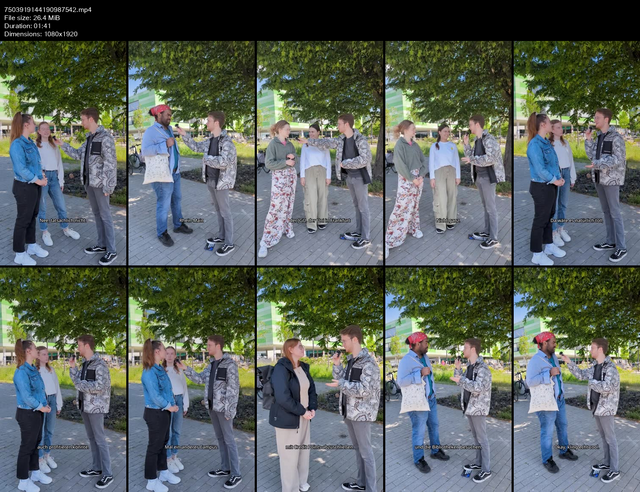
5.2 Automatic image captioning
A frequently used task for LMM is automatic image captioning or image-to-text conversion. For this, we use an example image from our Instagram dataset. We load it using magick::image_read() and resize it to make it easier to work with and visualize using magick::image_resize("640x").
magick::image_read("data/jgu_insta/2024-01-23_13-45-06_UTC.jpg") |>
  magick::image_resize("640x")
Again, we need to set up our access key for an external AI service.
# USE JGU API KEY, not original OPENAI KEY
JGU_API_KEY <- "XYZ"
jgu_ki <- chat_openai_compatible(
base_url = "https://ki-chat.uni-mainz.de/api",
model = "Qwen3 235B VL",
api_args = list(temperature = 0),
credentials = function() {
JGU_API_KEY
}
)As in the previous session, we can now send images and tasks to the JGU KI API using parallel_chat_structured().
Next, we are using the JGU KI API to ask to describe a specific Instagram image in detail. The task parameter is set to “Describe the image in detail.”, and we specify the output type as an object containing a string for description.
task <- "Describe the image in detail."
img_path <- "data/jgu_insta/2024-01-23_13-45-06_UTC.jpg"
tasks <- list(list(task, content_image_file(img_path)))

parallel_chat_structured(
  jgu_ki, tasks,
  type_object(description = type_string())
)
# A tibble: 1 × 1
description
<chr>
1 This is a professional head-and-shoulders portrait of a middle-aged man with …We get a very lengthy description in the response.
5.3 Text detection and translation
Another common task in LMM use is text detection (which requires optical character recognition or OCR). We try to extract the overlay captions from a TikTok video, by using list.files() to get the frame paths and head(4) to select the first four. We construct a list of tasks where each task contains the prompt and the frame image. Then, we use parallel_chat_structured() to send them all at once. The task parameter instructs the LMM to detect and extract any caption text and translate it to English, and we specify the type_object to receive both the caption_texts and caption_english as strings. Note that the LMM can accomplish both image and text-related tasks simultaneously.
image_paths <- list.files("jgu_tt/", pattern = "7503919144190987542.mp4.0.*", full.names = TRUE) |>
  head(4)

task <- "Look at the video stills frame by frame.
      (1) Find and extract all caption text and
      (2) translate the text to english."

tasks <- map(image_paths, ~ list(task, content_image_file(.x)))

parallel_chat_structured(
  jgu_ki, tasks,
  type_object(
    caption_texts = type_string(),
    caption_english = type_string()
  )
)
# A tibble: 4 × 2
caption_texts caption_english
<chr> <chr>
1 Nee, tatsächlich nicht. No, actually not.
2 Rhein-Main Rhine-Main
3 der | GU, der Uni in Frankfurt the | GU, the university in Frankfurt
4 Nicht ganz. Not quite. As expected, we obtain a tibble with two columns: the transcription and the translated text.
5.4 Zero-shot image classification
Zero-shot classification works the same way with image as with texts, provided we use a multimodal modal like Gemma. To start, we create a small dataset of image file paths from our Instagram folder using list.files(). We then use tail(3) to specifically select the last three images to work with for our classification example.
d_images <- tibble(image = list.files("data/jgu_insta/", pattern = "*.jpg", full.names = T)) |>
  tail(3)
d_images
# A tibble: 3 × 1
image
<chr>
1 data/jgu_insta//2024-05-10_12-33-13_UTC_1.jpg
2 data/jgu_insta//2024-05-30_14-03-05_UTC.jpg
3 data/jgu_insta//2024-06-10_12-03-08_UTC.jpg This next step displays the three selected images side-by-side. We use pull(image) to extract the image paths, magick::image_read() to load them, magick::image_resize("640x") to resize them, and then magick::image_montage(tile = "3") to arrange them into a montage for easy viewing.
d_images |>
  pull(image) |>
  magick::image_read() |>
  magick::image_resize("640x") |>
  magick::image_montage(tile = "3")
For the actual analysis, we define a detailed task for the LMM to describe an image and classify it based on several categories, such as image_type, whether one or more women or men are shown, and if the image shows a celebrate event. We specify the expected types for each category. We then use parallel_chat_structured() to apply this task to our selected images in parallel.
task <- "(1) Describe the image  in detail, and (2) provide annotations for the following categories:
(image_type) What type of image is it?
(women) one or more women shown in the image (true/false)?
(men) one or more men shown in the image (true/false)?
(celebrate) does the image show celebrations, awards, etc. (true/false)

Focus on persons and actions, if possible. Do not add additional text.
"

types <- type_object(
  description = type_string(),
  image_type = type_enum(values = c("photo", "illustration", "other")),
  women = type_boolean(),
  men = type_boolean(),
  celebrate = type_boolean()
)

image_paths <- d_images$image
tasks <- map(image_paths, ~ list(task, content_image_file(.x)))

d_results <- parallel_chat_structured(jgu_ki, tasks, types) |>
  as_tibble() |>
  mutate(image = image_paths)

d_results
# A tibble: 3 × 6
description image_type women men celebrate image
<chr> <fct> <lgl> <lgl> <lgl> <chr>
1 A cartoon-style illustration of a woma… illustrat… TRUE FALSE FALSE data…
2 A woman with short gray hair, wearing … photo TRUE TRUE FALSE data…
3 Three people — one man and two women —… photo TRUE TRUE TRUE data…In the end, we obtain all the coded categories in a tidy tibble.
5.5 Multimodal pipelines
Finally, we are bringing together different pieces of information about our TikTok videos. We use list.files() and jsonlite::read_json() to load metadata from JSON files, selecting specific fields like id, uploader, and title. We then use left_join() to combine this with the previously generated d_transcripts data frame by the common id column.
d_meta <- list.files("jgu_tt", pattern = ".json", full.names = TRUE) |>
  map(jsonlite::read_json) |>
  map_df(~ .x[c("id", "uploader", "title", "timestamp", "duration", "view_count", "like_count", "comment_count", "repost_count")]) |>
  left_join(d_transcripts, by = "id")
d_meta
# A tibble: 5 × 10
id uploader title timestamp duration view_count like_count comment_count
<chr> <chr> <chr> <int> <int> <int> <int> <int>
1 7503919… unimainz "RMU… 1.75e9 101 15000 583 16
2 7506143… unimainz "Has… 1.75e9 46 1112 36 1
3 7507622… unimainz "Wha… 1.75e9 28 1788 66 2
4 7509784… unimainz "Tag… 1.75e9 11 1821 72 1
5 7511339… unimainz "Wir… 1.75e9 30 1600 77 0
# ℹ 2 more variables: repost_count <int>, transcript <chr>For the zero-shot coding, we define a task to describe the video’s content and provide annotations for categories like women, men, and group. We specify these categories as boolean types. We then use parallel_chat_structured() to apply this task to each video’s contact sheet in parallel, creating a data frame of coded videos.
task <- "This is TikTok video.
(1) Describe the content of the whole video, not frame by frame, without introductory text,
(2) provide annotations for the following categories:

(women) one or more women shown in the video (true/false)?
(men) one or more men shown in the video (true/false)?
(group) more than one person shown in the video? (true/false)"

types <- type_object(
  description = type_string(),
  women = type_boolean(),
  men = type_boolean(),
  group = type_boolean()
)

image_paths <- list.files("jgu_tt", pattern = ".mp4.jpg", full.names = TRUE)
tasks <- map(image_paths, ~ list(task, content_image_file(.x)))

d_coded_vids <- parallel_chat_structured(jgu_ki, tasks, types) |>
  as_tibble() |>
  mutate(image = image_paths) |>
  mutate(id = basename(image) |> str_remove_all(".mp4.jpg"))
d_coded_vids
# A tibble: 5 × 6
description women men group image id
<chr> <lgl> <lgl> <lgl> <chr> <chr>
1 A group of four young adults, two men and two w… TRUE TRUE TRUE jgu_… 7503…
2 The video is a split-screen compilation featuri… TRUE TRUE TRUE jgu_… 7506…
3 The video shows a series of outdoor scenes cent… TRUE TRUE TRUE jgu_… 7507…
4 A collage of scenes from the 'Tag der offenen U… TRUE TRUE TRUE jgu_… 7509…
5 A montage of scenes from a university open day … TRUE TRUE TRUE jgu_… 7511…Finally, we combine all our data by using left_join() to merge the d_meta data frame (containing video metadata and transcripts) with the d_coded_vids data frame (containing the LMM’s visual analysis) based on their common id column.
d_meta |>
  left_join(d_coded_vids, by = "id")
# A tibble: 5 × 15
id uploader title timestamp duration view_count like_count comment_count
<chr> <chr> <chr> <int> <int> <int> <int> <int>
1 7503919… unimainz "RMU… 1.75e9 101 15000 583 16
2 7506143… unimainz "Has… 1.75e9 46 1112 36 1
3 7507622… unimainz "Wha… 1.75e9 28 1788 66 2
4 7509784… unimainz "Tag… 1.75e9 11 1821 72 1
5 7511339… unimainz "Wir… 1.75e9 30 1600 77 0
# ℹ 7 more variables: repost_count <int>, transcript <chr>, description <chr>,
# women <lgl>, men <lgl>, group <lgl>, image <chr>This gives us a complete dataset for our data analysis.
5.6 Homework
Try your own content analysis using any text and/or image data you like (including our example data from previous sessions).
Do we get different results when coding the contact sheets compared to the individual frame images?